
Start here
Gamification principles
XP Arena is a framework for gamifying a class. The mechanics that make a game engaging are used to make learning more challenging and more fun, without turning the class into a race that only the fastest player can win.
Seven principles do most of the work. A new game already uses all of them, and the links go to the articles with the exact settings and screens.
Points

What it is: points turn effort into a number that grows. Every completed task adds to a total, so progress is constant and visible instead of arriving weeks later with a grade.
In XP Arena: every quest has a maximum XP value and an optional bonus XP value. XP is awarded the moment a quest is completed: automatically when a player passes a linked minigame or enters a secret code, or by the gamemaster from the Players page. Enough XP raises the player's level, following the XP curve set in Settings. Automatic achievements award a percentage of the game's total XP. XP rewards the work that leads to the grade, not only the grade itself.
Quests and XP explains the three completion methods and bonus XP.
Badges

What it is: badges are permanent, visual proof of a milestone. They show what a player has achieved, not only how far along they are.
In XP Arena: achievements unlock automatically, such as Early Bird for a quest between six and nine in the morning, Double Strike for two quests in one hour, and On a Roll, Week Warrior and Unstoppable for a streak of three, seven or fourteen days. There are badges for saving an avatar and wearing items from a higher tier, and a Completionist badge for finishing every published quest. They appear on the player profile and in the finale. The gamemaster does not hand them out; they unlock themselves.
Achievements and finale lists the conditions and the closing slideshow.
Leaderboards

What it is: a ranking makes progress social. Seeing where you stand among your peers can be a reason to push further.
In XP Arena: the scoreboard ranks every active player by total XP. Click a player to open the profile with avatar, level and badges. A player can choose to be invisible: the gamemaster still sees them, other players do not. When players are divided into teams, the scoreboard and the Players page can be filtered by team. Use the scoreboard to celebrate progress during class; it is a snapshot, not a final judgement.
Scoreboard and insights shows the ranking and the results afterwards.
Performance graphs

What it is: progress is easier to keep going when you can see it. A bar, a level or a path answers the question where am I, and what is next?
In XP Arena: the player profile has an XP bar that shows progress within the current level. The quest map shows which quests are open and which gates still need work. Insights shows completion, pass rates and time spent per quest, and the finale replays a player's route through the game with XP, level, rank and highlights.
The quest map and scoreboard and insights cover both views.
Meaningful stories

What it is: dry material becomes easier to remember when it is part of a story with a goal, characters and a reason to keep going.
In XP Arena: every game starts with a learning goal, a story and a concrete in-game goal. Quest givers are characters with a name, a story and their own goal, and every quest is handed out by one of them. The quest map is the world players move through, and a crowned finale closes the story with a slideshow of their run. The vocabulary follows the theme too: a quest is a quest, the teacher is the gamemaster, and the last assignment is the climax of the story.
Characters and story explains how to write the quest givers.
Avatars

What it is: a personal character turns a player into someone with a stake in the game. You are not a row in a spreadsheet; you are the hero of your own run.
In XP Arena: every player builds an avatar from ready-made parts, with hue, saturation and brightness per category. Higher tiers unlock as the player levels up; the gamemaster chooses in Settings how tiers unlock: based on the XP the quests actually add up to, the game's maximum level, or a custom level for Tier 4. Avatar tier badges are usage based: save an avatar that wears an item from a tier to earn that badge. The avatar appears on the profile, the scoreboard and the player cards.
Avatars and levels shows the builder and the tiers.
Teammates
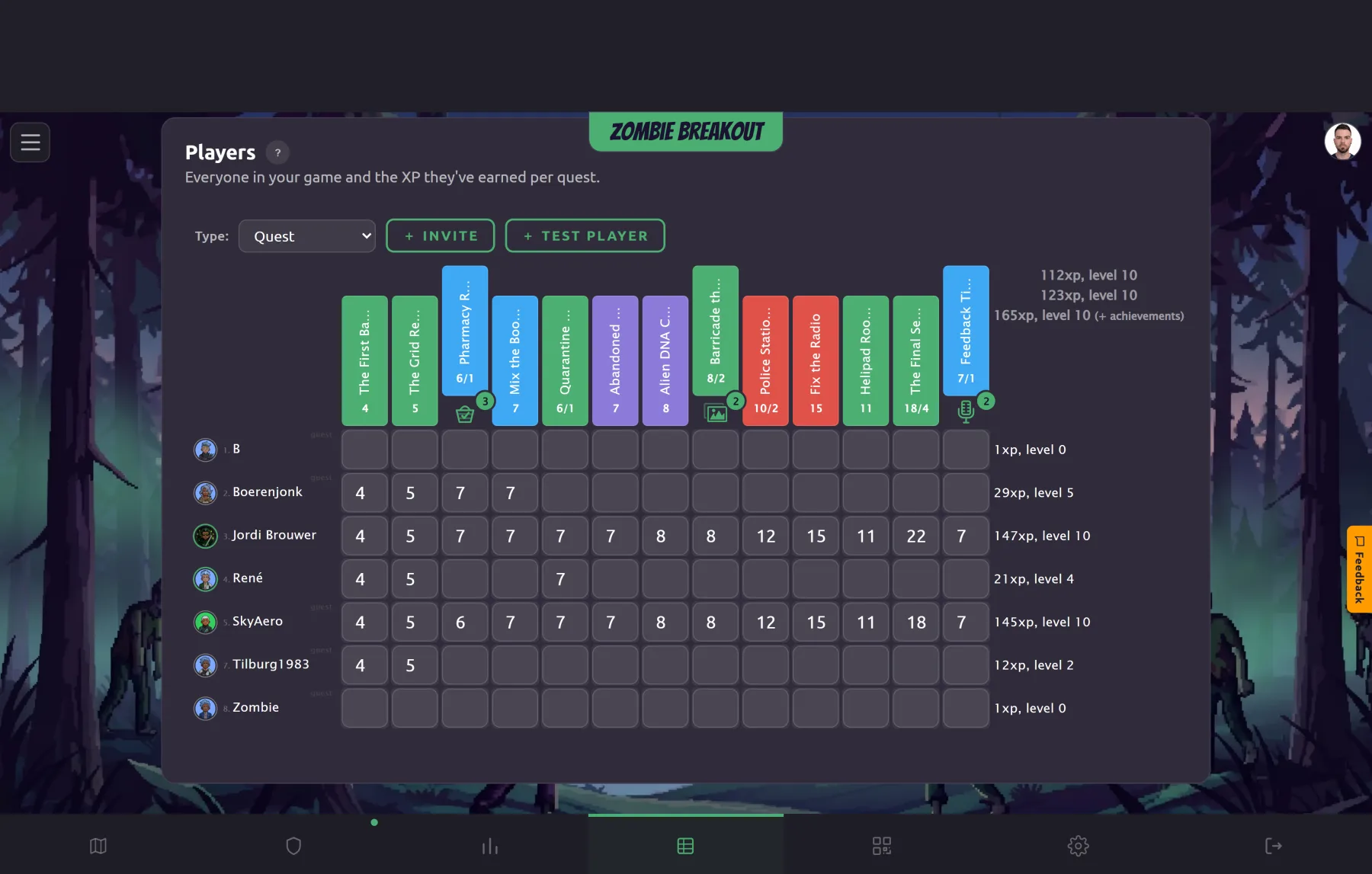
What it is: a game is more fun with other people. Teams give players a group to belong to and a reason to help each other.
In XP Arena: a gamemaster can put players into teams from the Players page. The table and the scoreboard can then be filtered by team, so a group can see its own progress without a second ranking. For activities where the whole class works on one result, use a minigame such as Gallery, Word Cloud or Interview. The scoreboard stays individual, so cooperation does not disappear behind a team average.
Players and XP covers teams and feedback; What are minigames? lists the class-wide games.
How the seven work together
Points and progress make effort visible. Badges mark the milestones. The scoreboard and teams make the game social. The story and the avatar make it personal. A new game already uses all seven; you can tune the XP curve, avatar tiers and story later in Settings.